Uncategorised

Fetch

Collect Digital Evidence from Macs and iPhones—With Secure Remote Mac Collection and Cloud Uploads.

Fetch helps examiners securely collect digital evidence from Macs and iPhones, whether the device is nearby or with a remote custodian. Examiners define what to collect, and Fetch packages the files with supporting reports. For remote Mac collections, custodians use a guided app to collect, encrypt, and upload the results to the examiner’s designated cloud storage—without needing the examiner’s cloud credentials or requiring the examiner to remain online.


Manage Cases Custodians, Clouds, and Reports

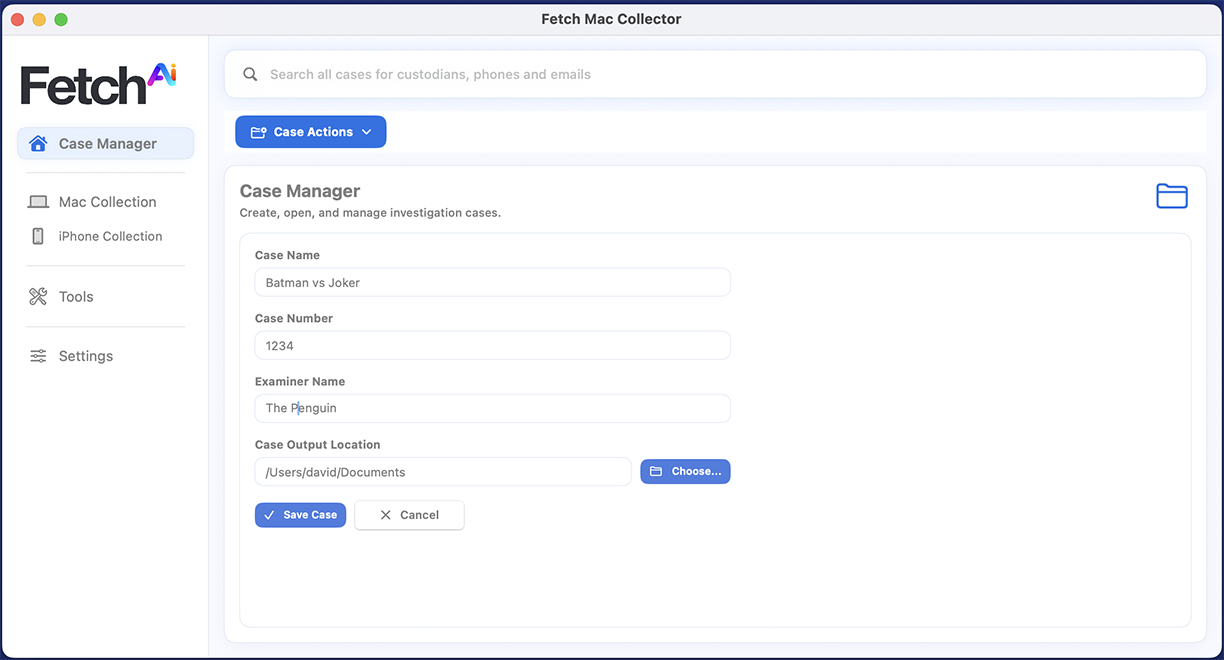
Keep every collection connected to its case. Fetch’s Case Manager brings together case details, custodian information, cloud destinations, and collection reports, helping examiners organize local and remote work from setup through review. Search across cases to find custodians and contact details, and keep collected files and supporting reports organized in their designated case folders.
Seven Unlimited Ways to Collect Data from Local and Remote Macs—Without Collection Limits or Services 


Collect data locally or remotely—with no subscription required.

Fetch gives examiners flexible ways to select computer data: match files by hash, target specific folders, choose predefined file groups, build custom groups, or focus on a particular user account. Drag and drop files and folders for targeted collection, or index and search to find relevant material before collecting it.
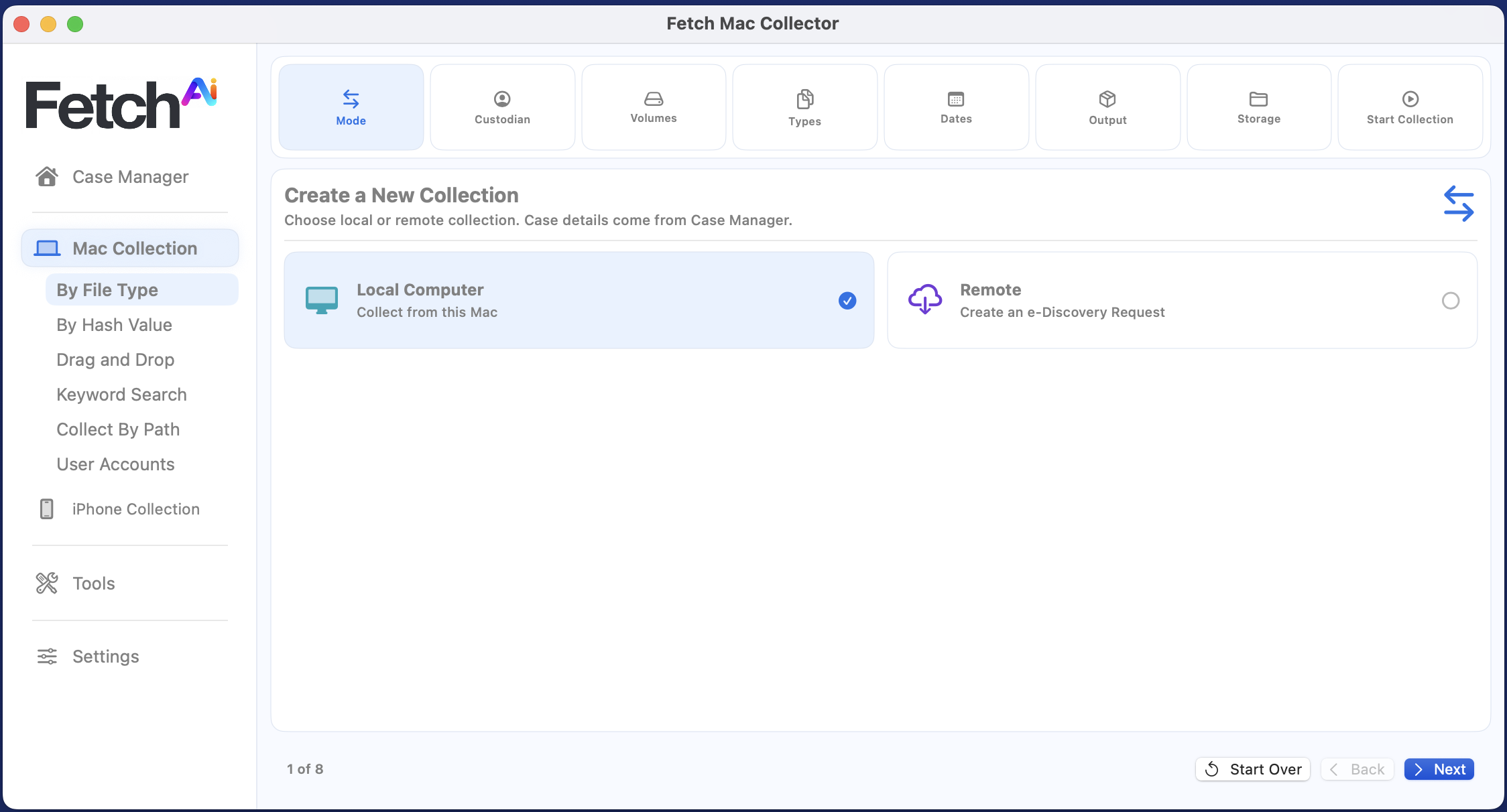
  • By Hash Values: Find and collect files that match a supplied list of digital fingerprints, known as hashes.
  • By Folder: Select specific folders and collect their contents, including files within subfolders.
  • By File Group: Choose predefined categories, such as documents, images, or videos, to collect the file types relevant to your investigation.
  • By Custom Group: Create your own collection group by combining selected file types to suit the needs of a case.
  • Drag and Drop: Drag selected files or folders into Fetch to add them to a targeted collection.
  • Index and Search: Build a searchable index to locate relevant files, review the results, and select what to collect.
  • By User Account: Focus collection on a selected user’s account, helping narrow the scope on computers shared by multiple people.

Fetch Collects iPhone Data. Prepares It for Review.

iPhone Collection for Cyber Investigations, Litigation, and Law Enforcement

Fetch performs logical collections of iPhone data for examiners, collecting available event and diagnostic logs for cyber investigations, preserving text conversations and attachments in RSMF format for import into RelativityOne, and producing professional chain-of-custody documentation for law enforcement. Case-organized collection packages and supporting reports keep the collected data documented and ready for review.

Collection options include:
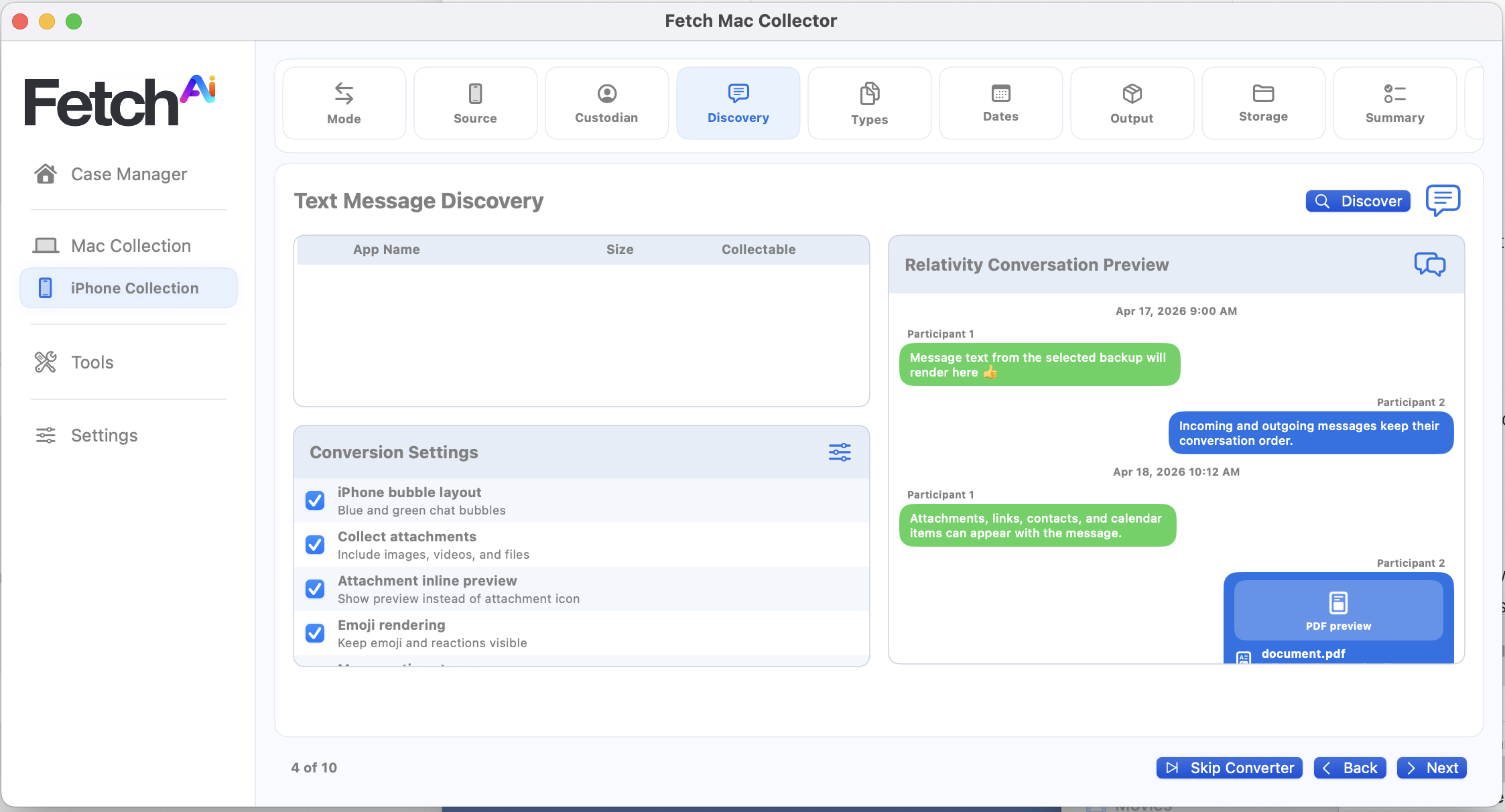
  • Messages and Attachments: Collect text conversations with associated images, videos, and files, with optional inline previews.
  • Selected Data Categories: Target contacts, call history, photos, videos, notes, Safari data, and available app, location, and device artifacts.
  • Custom Groups: Define additional file-type groups for targeted collection.
  • Date Filtering: Limit message exports to a selected date range.
  • Message Presentation: Choose participant names, timestamps, emoji, conversation grouping, and attachment display options.
  • Diagnostics: Include available crash, analytics, and diagnostic logs, with supported live console capture.
  • Output Packages: Prepare artifact ZIPs, forensic backup packages, RSMF packages, attorney HTML/PDF review copies, and optional Relativity DAT/OPT load files.
  • Supporting Reports: Include collection summaries, device profiles, file manifests, workbooks, and chain-of-custody records.

Read more …Fetch

  • Hits: 250

REMI

PORTABLE AI TRAINED IN CYBER TRADECRAFT. BUILT TO THINK LIKE AN INVESTIGATOR.

  • AI Pipeline That Takes Control of the Forensic Workflow

    REMI ingests mixed-source logs and records across vendors, platforms, and operational systems. It cleans, normalizes, and analyzes the records to identify how access was achieved, which accounts and devices were involved, where activity moved, what systems were touched, and which records should be preserved for deeper review.

  • Detection Identifies Flagged Behaviors and Attack Patterns

    REMI analyzes records across accounts, endpoints, cloud services, VPNs, firewalls, identity systems, operational platforms, industrial environments, and enterprise networks. It identifies flagged behaviors such as unusual sign-ins, command execution, file changes, configuration changes, lateral movement, repeated IPs, and relationships between users, machines, systems, and network activity.

  • Correlation Maps Detections to Accounts, Networks, Systems, and Exposed Data

    REMI connects related events across disconnected logs and source records, including enterprise systems, industrial platforms, cloud records, endpoints, identity logs, network activity, financial records, access-control systems, and incident files. It builds connected paths showing what happened, how activity moved, which systems were touched, what remains unresolved, and which records support each finding.

  • Automated Reporting Turns Source Records Into a Structured SITREP

    REMI turns scattered records into a clear investigation report. It organizes logs, notes, timelines, interviews, artifacts, and source records into a structured narrative that explains what happened, who or what was involved, which systems or records were affected, what records support each finding, and what actions should be taken next.

  • Mixed Records Become One Investigation Timeline

    REMI brings together logs, user activity, system events, cloud records, endpoint data, identity records, operational tools, and vendor records into one unified timeline. It connects related events, repeated indicators, timestamps, accounts, devices, IPs, files, processes, commands, and configuration changes to reveal the sequence of activity.

  • Local IP Lookup Connects Network Activity to Case Records

    REMI’s local IP lookup scans case records for IP addresses, removes duplicates, separates private and internal addresses from public ones, and enriches public IPs with flagged-connection context, geolocation, ASN, hosting, domain history, and source-record context. Investigators can see which IPs appeared in the case, where they resolved, which accounts or devices touched them, and which records support the connection.
Choose Your AI Pipeline


Airport Networks

REMI analyzes access-control logs, badge activity, camera metadata, maintenance records, vendor activity, incident reports, and airport-specific network services offline across terminal, airside, baggage, ground-operations, and restricted-facility environments. It identifies what happened, how access was achieved, which people, accounts, devices, systems, and areas were involved, and whether unauthorized access, abnormal movement, suspicious operational patterns, insider misuse, theft, sabotage, compliance violations, or safety risks affected airport operations.
Read more

Water Treatment

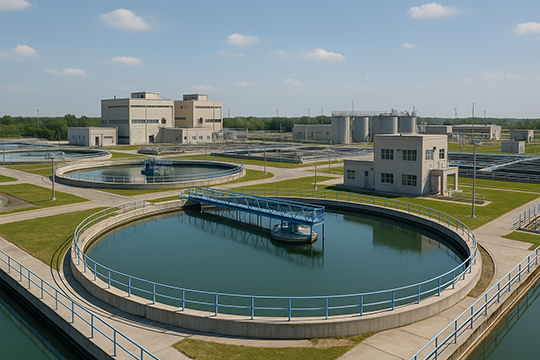
REMI analyzes SCADA logs, PLC and HMI activity, historian records, access-control logs, operator actions, maintenance records, vendor activity, alarms, sensor readings, and incident reports offline across treatment plants, pump stations, lift stations, reservoirs, chemical-feed systems, and distribution environments. It identifies what happened, how access was achieved, which people, accounts, devices, systems, and process areas were involved, and whether unauthorized access, abnormal control activity, suspicious operational patterns, insider misuse, sabotage, compliance violations, or public-safety risks affected water operations.

Read more

Nuclear Power

REMI analyzes SCADA logs, PLC and HMI activity, historian records, access-control logs, operator actions, maintenance records, vendor activity, alarms, sensor readings, engineering workstation activity, and incident reports offline across reactor, turbine, safety, auxiliary, security, and restricted-access environments. It identifies what happened, how access was achieved, which people, accounts, devices, systems, and plant areas were involved, and whether unauthorized access, abnormal control activity, suspicious operational patterns, insider misuse, sabotage, compliance violations, or safety risks affected nuclear operations.
Read more

Electric Grids

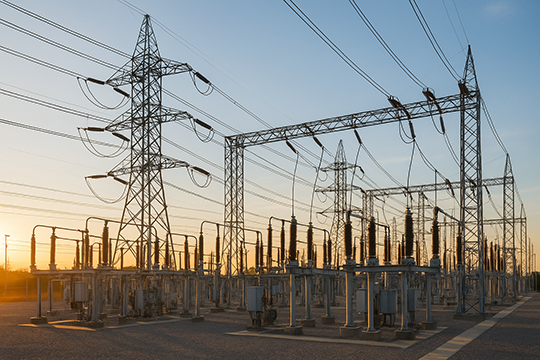
REMI analyzes SCADA logs, EMS/DMS activity, substation and relay records, access-control logs, operator actions, maintenance records, vendor activity, alarms, sensor readings, network telemetry, and incident reports offline across generation, transmission, distribution, substation, control-center, and field-service environments. It identifies what happened, how access was achieved, which people, accounts, devices, systems, and grid assets were involved, and whether unauthorized access, abnormal control activity, suspicious operational patterns, insider misuse, sabotage, compliance violations, or reliability and safety risks affected grid operations.

Read more

Financial Crimes

REMI analyzes bank statements, payment applications, general ledgers, QuickBooks records, NetSuite records, transaction history, account activity, vendor records, invoices, approvals, user activity, alerts, case notes, and incident reports offline across finance, accounting, payroll, procurement, vendor-management, and financial operations environments. It identifies what happened, how money moved, which people, accounts, vendors, customers, entities, transactions, systems, and approvals were involved, and whether fraud, diversion, duplicate payments, account takeover, insider misuse, synthetic identity activity, compliance violations, or suspicious financial patterns affected the organization.

Read more

Incident Response

REMI analyzes endpoint logs, EDR alerts, SIEM exports, firewall and VPN logs, identity records, email security data, cloud activity, DNS and proxy logs, file and process activity, command history, malware indicators, case notes, and incident reports offline across endpoints, servers, cloud services, user accounts, applications, networks, and security tools. It identifies what happened, how access was achieved, which people, accounts, devices, systems, files, processes, IPs, domains, and services were involved, and whether malware, credential abuse, lateral movement, persistence, exfiltration, insider misuse, policy violations, or business-impact risks affected the organization.

Read more

Read more …REMI

  • Hits: 57

Airports

Your Airport is Experiencing a disruption. Is it a system misconfiguration - or is a cyber attack underway? 

Say hello to REMI AI for Airports

Airport cyber incident investigations often involve records scattered across enterprise networks, airport operations systems, access-control platforms, badge records, baggage systems, flight-information displays, gate systems, vendor maintenance access, camera metadata, facility-control systems, security tools, and operational event records. REMI AI brings those mixed sources together and generates a cyber SITREP that explains the situation in plain English. It identifies what happened, how access was achieved, which systems were touched, whether airport operations or facility-control activity occurred, where suspicious files or AI-spawned tools appeared, what remains unproven, and which records support the sequence.

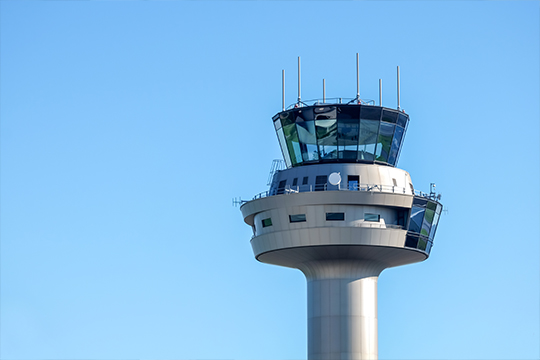
REMI analyzes tower-system and airport IT event logs to identify flagged behaviors, affected systems, and source records tied to advanced cyber attacks.

REMI Airport brings together many different airport records into one AI-driven incident reconstruction. Airport network data, tower event records, access-control logs, baggage and display systems, gate and terminal operations, ramp activity, facility controls, and vendor case records all feed into REMI’s AI analysis pipeline.

REMI then normalizes the mixed-format records, connects related behavior across systems, and reconstructs the sequence of events. The result is a unified timeline, a Cyber SITREP identifying affected systems and operational indicators, and prioritized next steps for preservation, review, verification, and follow-up.
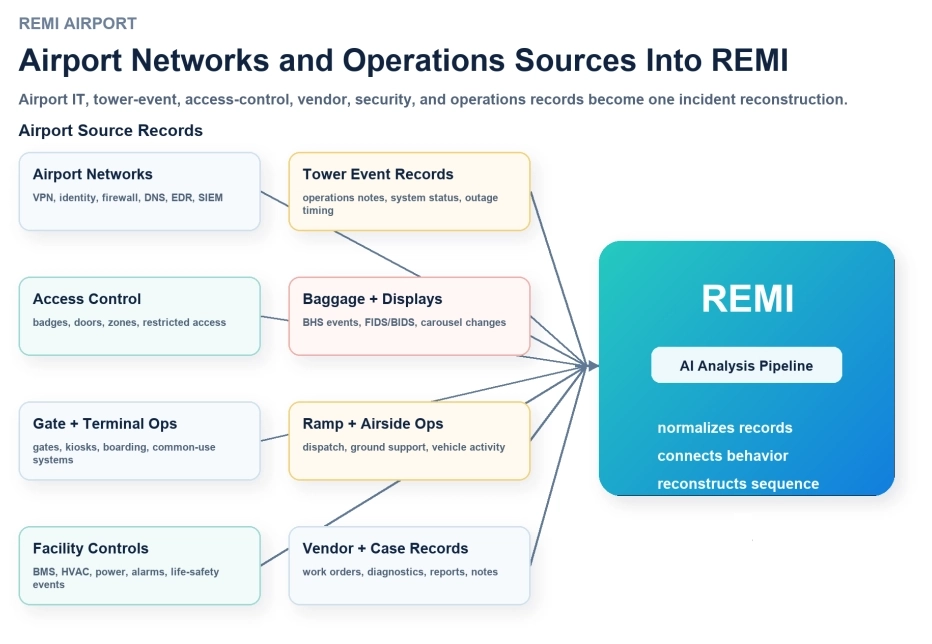
REMI exposes pre-positioned adversarial AI behaviors inside airport and tower systems

REMI is trained to identify adversarial behaviors associated with advanced AI attacks, AI-controlled malware, and hybrid attack patterns across airport and tower system logs. It analyzes suspicious access, out-of-pattern system changes, unexpected communications, and coordinated events to surface behaviors that may indicate staged or AI-assisted attacker activity.

  • Airport

    Airport Systems

    Arrivals and departures displays (FIDS)
    Flight Information Display System servers, display management consoles, media players, arrival/departure boards, and gate displays.
    Airport operations database
    Flight schedules and status records, operational databases, flight-data feeds, and interfaces that distribute airport information.
    Gate, stand, and resource allocation
    Gate and stand assignment services, resource planning applications, operations workstations, and shared allocation interfaces.
    Check-in and self-service
    Check-in counters, common-use workstations, self-service kiosks, boarding-pass printers, bag-tag printers, and airline interfaces.
    Boarding and gate processing
    Boarding-pass readers, gate workstations, passenger validation services, boarding applications, and gate control interfaces.
    Baggage handling and sortation
    Baggage control servers, conveyor and sorter controllers, operator panels, routing services, barcode/RFID readers, and maintenance stations.
    Baggage reconciliation and tracking
    Reconciliation servers, handheld loading scanners, bag-tracking services, loading records, and airline baggage interfaces.
    Badge and physical access
    Badge management servers, card readers, door controllers, visitor systems, access-control workstations, and access event logs.
    CCTV and video management
    IP cameras, network video recorders, video management servers, viewing workstations, video storage, and camera management services.
    Passenger announcements and signage
    Announcement servers, public-address control systems, information kiosks, digital signage players, and emergency message interfaces.
    Cargo and freight
    Cargo management servers, warehouse workstations, freight scanners, shipment tracking, and cargo access or release services.
    Fueling operations
    Fuel management servers, dispatch workstations, metering controllers, fueling transaction records, and maintenance interfaces.
    Ground equipment and docking
    Passenger boarding bridge controls, docking guidance displays and controllers, ground-power monitoring, and maintenance workstations.
    Parking, transport, and payments
    Parking servers, barrier and ticket controllers, payment terminals, retail point-of-sale systems, and ground transport information services.
    Facilities and airfield support
    Building management servers, HVAC controllers, power/UPS monitoring, and airfield lighting control or maintenance interfaces.
    Airline, tenant, and vendor integrations
    Partner gateways, data exchange services, airline operational feeds, contractor support systems, and shared service interfaces.
    Tower and surveillance (separate environment)
    Tower workstations, surveillance processing servers, radar-data interfaces, operational recording services, and system-health monitoring.
  • IT Network

    IT Network

    Endpoints and workstations
    Staff PCs, laptops, administrator workstations, maintenance PCs, and endpoint operating-system logs.
    Servers and storage
    Windows and Linux servers; file shares, storage arrays, application servers, and system administration services.
    Identity and authentication
    Active Directory, Entra ID, single sign-on, multifactor authentication, service accounts, and privileged-access services.
    Smart cards and certificates
    CAC/PIV readers where deployed, certificate-based sign-in, certificate authorities, and certificate enrollment or revocation services.
    Network devices and wireless
    Routers, switches, wireless controllers, access points, network access control, and network management services.
    Firewalls and network security
    Perimeter and internal firewalls, intrusion detection/prevention, network sensors, and segmentation controls.
    VPN and remote maintenance
    VPN gateways, remote desktop services, jump servers, vendor support portals, and remote-access appliances.
    DNS, web, proxy, and API services
    DNS servers, web proxies, web gateways, web servers, reverse proxies, and API gateways.
    Email
    Mail servers and cloud mailboxes, email security gateways, message tracing, attachments, and mailbox audit services.
    Collaboration
    Messaging, meeting, voice, shared-document, and team collaboration services; administrative and access audit logs.
    Cloud platforms
    Cloud accounts and subscriptions, hosted applications, cloud storage, cloud networking, and management audit services.
    Applications and databases
    Business applications, database servers, integration services, scheduled jobs, and application or database audit logs.
    Virtual machines and hypervisors
    VM hosts, hypervisors, virtual desktops, virtualization consoles, snapshots, templates, and guest operating systems.
    Backups and recovery
    Backup servers, backup agents, repositories, recovery consoles, replication services, and restore jobs.
    Endpoint protection
    Antivirus, endpoint detection and response, application control, quarantine services, and security management consoles.
    SIEM and monitoring
    Microsoft Sentinel or other SIEM platforms, log collectors, alert services, security dashboards, and monitoring servers.
    Data protection
    Data-loss prevention, file-access auditing, removable-media controls, cloud data controls, and transfer monitoring.
    Code, secrets, and deployment
    Code repositories, build servers, deployment pipelines, secrets vaults, API keys, and software distribution services.
    Mobile devices and communications
    Managed phones and tablets, mobile-device management, softphones, and enterprise voice services.
    AI platforms and automation
    Model gateways, AI application servers, automation accounts, worker hosts, job queues, and model/tool-use audit services.

REMI's Advanced Correlation Analysis Connects Disparate Signals Into a Coherent Attack Picture and Timeline

REMI can process hundreds of thousands of data points through its correlation AI engine to reveal the attack story hidden inside the noise.

It connects suspicious logins, unusual system changes, unexpected communications, privilege activity, endpoint signals, and operational anomalies across disconnected systems. What may look like isolated events becomes a coordinated pattern: staged access, adversarial automation, AI-assisted malware behavior, lateral movement, and pre-positioned activity before visible disruption occurs.

Instead of forcing analysts to chase scattered alerts one by one, REMI assembles the evidence into a clearer picture of what happened, where it touched, and which systems may be affected next.

REMI Correlates The Airport Attack Path Across Systems

REMI links separate records into a connected sequence of access, movement, and affected infrastructure.
✓ Connection: stolen-laptop record → VPN login
Details: AOPS-LT-18 was tied to c.arden, whose VPN login came from 203.0.113.44 one week after the laptop was reported stolen.
Why it matters: The same engineer’s device history and account activity are now linked to the remote-access event.
✓ Connection: VPN login → airport business network
Details: The c.arden VPN session reached 10.44.18.25 inside the airport business network 13 seconds after login.
Why it matters: The remote session did not stop at authentication; it reached an internal network destination.
✓ Connection: business network → operations desktop
Details: The same session moved from 10.44.18.25 to AOPS-DT-07 43 seconds later.
Why it matters: The activity moved from network entry into a usable internal desktop environment.
✓ Connection: operations desktop → airport systems workstation
Details: AOPS-DT-07 connected toward AIR-OPS-04 inside the airport operations support environment 2 minutes 12 seconds later.
Why it matters: The path crossed from business-network access toward airport operations support systems.
✓ Connection: airport systems workstation → flight-ops records
Details: AIR-OPS-04 activity aligned with flight-operations support records 2 minutes 38 seconds later.
Why it matters: The airport systems workstation path is now connected to flight-ops support records.

Analysis Adds the Details, Fills in the Narrative Gaps, and Explains How the Attack Happened and Why the Alarms Stayed Quiet

REMI turns correlated evidence into the supported explanation of how the activity unfolded and why the warning signs did not become obvious sooner.

Analysis uses the connected evidence path to explain how access was achieved, how activity moved, which systems or airport areas were affected, why alerts or controls did not tell the full story, what evidence supports each conclusion, and what remains unresolved.

Analysis determined that the incident progressed because vendor_ops_14 established a remote VPN session from 203.0.113.44 and reached the airport IT network at 10.88.14.25. The same vendor account, VPN session window, source IP address, airport-network destination, and firewall flow records later aligned with activity on OPS-DT-09, traffic toward GATE-SUP-04, and access-control records near Terminal B Gate 22.

1 1 wk earlier
Stolen LaptopNPE-LT-18 reported stolen
7 days later
2 1:14 AM
VPN Loginc.arden from 203.0.113.44
3 sec later
3 1:14 AM
Business Entryconnected to 10.77.18.25
12 sec later
4 1:15 AM
Firewall Flowtoward NPE-ENG-04
2 min later
5 1:17 AM
Engineering ActivityNPE-ENG-04 workstation records
4 min later
6 1:21 AM
Historian Recordssupport activity out of plan

On-The-Spot Reporting

REMI generates both airport-specific reports and broader incident response reports from the same evidence package. For airport environments, the reports focus on IT, identity, access control, badge activity, camera metadata, gate operations, ramp support, baggage systems, vendor access, maintenance records, and flight-support activity.


  • Reporting Package

    ✓ Executive Summary
    What happened, what systems were affected, and what needs attention.
    ✓ Detection Summary
    Flagged behaviors, triggered indicators, affected sources, and first observed activity.
    ✓ Behavioral Analysis
    Suspicious access, unusual process activity, abnormal commands, persistence, tool spawning, and disruption patterns.
    ✓ Timeline Report
    Event-by-event sequence showing when activity began, spread, changed, and ended.
    ✓ Correlation Report
    Connects accounts, devices, IP addresses, files, processes, sessions, and events across separate sources.
    ✓ Group / Entity Analysis
    Related users, vendors, machines, tools, accounts, and systems involved in the event.
    ✓ Affected Systems Report
    Touched devices, high-priority systems, and records showing configuration or settings changes.
    ✓ Forensic Preservation Report
    Files, paths, logs, artifacts, scripts, binaries, hashes, and evidence to preserve.
    ✓ Cyber SITREP / Next Steps Report
    Size, scope, findings, open questions, and prioritized responder actions.
  • SitRep

    ✓ What happened
    The evidence-backed sequence of events from first activity through affected systems.
    ✓ Who and what was involved
    Accounts, devices, networks, systems, vendors, files, sessions, and source records.
    ✓ How the activity moved
    Entry point, connection path, lateral movement, trusted access paths, and systems touched.
    ✓ Insider or assisted access review
    Account use, approvals, shared access, vendor activity, or open remote tools tied to the evidence.
    ✓ What is fully answered
    Findings supported by source records, timestamps, logs, artifacts, and system activity.
    ✓ What remains unresolved
    Open questions where the current evidence does not yet prove the full answer.
    ✓ What data is needed next
    Logs, approvals, asset-owner records, vendor records, source files, or telemetry needed to close each gap.
    ✓ What to do right now
    Preserve, isolate, sandbox, remove, remediate, verify, escalate, or request additional records.
  • Story Gaps

    ✓ Partly answered: REMI confirmed the VPN session used vendor_maint_02 outside the normal access window.
    Question: Was the VPN login approved?
    Event logs needed: Maintenance ticket, vendor work order, change approval, and MFA approval record.
    ✓ Partly answered: REMI confirmed the VPN login came from 203.0.113.44, a source IP not seen in prior sessions.
    Question: Was this source location expected?
    Event logs needed: VPN source-IP history, identity sign-in logs, geolocation records, and vendor access baseline.
    ✓ Answered: REMI confirmed the session reached 192.165.43.18 after authentication.
    Detail gap: Was this an approved intermediate host?
    Event logs needed: Asset inventory, firewall flow logs, DHCP/DNS records, system owner records, and approved remote-access path records.
    ✓ Partly answered: REMI connected the VPN session to traffic toward ENG-WS-04.
    Question: Which engineering actions were performed?
    Event logs needed: EDR telemetry, engineering workstation logs, project-file access records, tool execution logs, and jump-host records.
    ✓ Open question: The account owner behind the VPN session is not fully proven.
    Question: Who used the VPN account?
    Event logs needed: MFA device record, identity provider logs, account-owner record, vendor assignment record, and privileged-access logs.
  • Actionable items

    1 Preserve VPN and endpoint evidence first
    Preserve logs for vendor_maint_02, source IP 203.0.113.44, internal host 192.165.43.18, desktop OPS-DT-07, and engineering workstation ENG-WS-04 before removal.
    2 Isolate the affected desktop and engineering workstation
    Isolate OPS-DT-07 and ENG-WS-04 from the network. Firewall and EDR records show the VPN path moved through these systems.
    3 Locate malware paths on ENG-WS-04
    Search ENG-WS-04 for C:\Users\Public\update-task.vbs, C:\Temp\stage.ps1, and C:\ProgramData\svc-loader.bat.
    4 Locate AI-spawned controller on OPS-DT-07
    Search OPS-DT-07 for C:\Users\j.martinez\AppData\Roaming\sysrunner.exe and preserve a forensic copy for sandboxing.
    5 Remove confirmed staged scripts after preservation
    After preservation, remove C:\Temp\stage.ps1, C:\ProgramData\svc-loader.bat, and C:\Users\Public\update-task.vbs from affected hosts.
    6 Disable exposed remote access
    Disable vendor_maint_02, revoke active VPN sessions, rotate credentials, reset MFA, and review vendor access tied to 203.0.113.44.
    7 Scrub affected engineering folders
    Review and remediate project folders on ENG-WS-04, including D:\Engineering\Projects\NorthPump and related control-support files touched during the session.
    8 Verify no return activity
    Check OPS-DT-07, ENG-WS-04, 192.165.43.18, and VPN logs for new callbacks, scheduled tasks, repeated processes, reopened sessions, or restored persistence.

REMI Airport Use Cases

Read more …Airports

  • Hits: 1129

About REMI

Say Hello to REMI

REMI stands for Remote Embedded Machine Intelligence: an AI forensic system built to analyze evidence locally and reconstruct what happened.

REMI is trained to recognize the behaviors behind advanced adversarial cyber attacks, not just isolated alerts or known malware signatures. It analyzes event logs, endpoint activity, identity records, VPN sessions, firewall traffic, file activity, commands, scripts, system changes, and operational records to identify how an attack is unfolding across the evidence.

REMI looks for behavior patterns associated with state-sponsored and advanced persistent threat activity, including quiet access, credential misuse, living-off-the-land commands, remote access abuse, lateral movement, tool staging, persistence, data access, configuration changes, and pre-positioning inside critical infrastructure networks. These are the kinds of patterns seen in advanced campaigns, including Volt Typhoon-style activity, where the concern is not always immediate destruction, but stealthy movement, access maintenance, and positioning inside important systems.

Instead of relying on one alert to explain the incident, REMI connects the records that belong together and reconstructs the activity into a clear forensic story: how access was achieved, which systems were touched, what changed, what evidence supports the finding, what remains unresolved, and what responders should do next.

Once REMI Shows You What AI Can Do, You’re Going to Love It. I Guarantee It.

Read more …About REMI

  • Hits: 435

More Articles …